Build Your Own Private ChatGPT: The Complete Guide to Ollama + Open WebUI (2026)
By EvoMind Tech
Data privacy is no longer a luxury; it is a technical requirement. While cloud-based LLMs like GPT-5 and Claude 4.5 offer immense power, they come with significant trade-offs in data sovereignty, subscription costs, and latency. In 2026, the local AI ecosystem has matured to the point where consumer-grade hardware can outperform many mid-range cloud models. This guide provides the definitive blueprint for deploying Ollama v0.24.0 and Open WebUI v0.3.35—the gold standard for a private, self-hosted AI stack.
The Architecture: How It Works
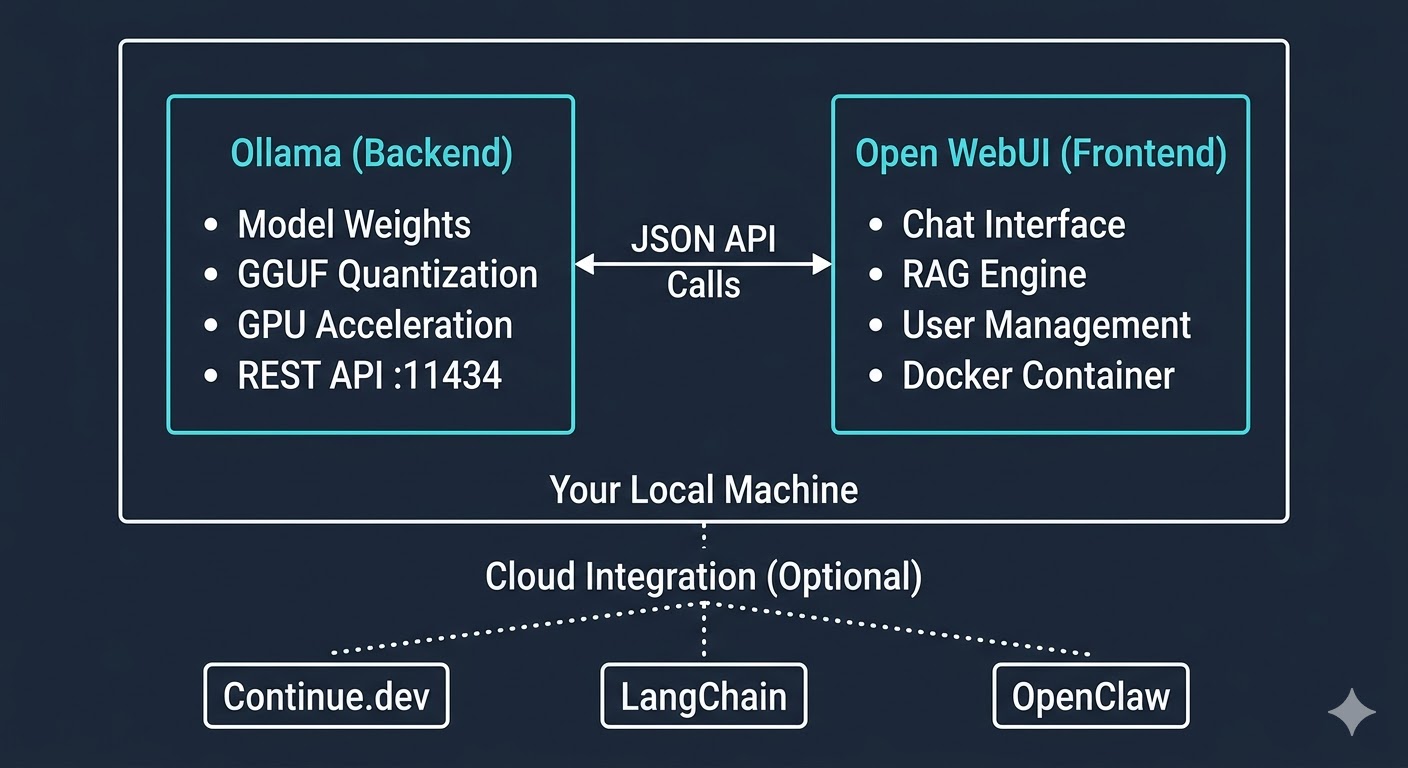
To build a private ChatGPT, we decouple the "brain" (the LLM runner) from the "face" (the user interface). This separation of concerns allows for maximum flexibility and performance tuning.
- Ollama (The Backend): A lightweight, highly optimized inference engine that manages model weights, quantization, and GPU acceleration. It exposes a REST API on port
11434. - Open WebUI (The Frontend): A feature-rich, Docker-based interface that provides a "ChatGPT-like" experience. It communicates with Ollama via the API and handles user accounts, RAG (Retrieval Augmented Generation), and chat history.
When you type a prompt in Open WebUI, it sends a JSON payload to Ollama. Ollama loads the model into your VRAM, processes the request, and streams the response back to the UI. Everything stays on your local network.
Local vs. Cloud LLMs (2026 Comparison)
| Feature | Cloud (GPT/Claude) | Local (Ollama + Open WebUI) |
|---|---|---|
| Privacy | Data used for training (opt-out available) | 100% Air-gapped / Private |
| Cost | $20+/month per user | One-time hardware cost + Electricity |
| Latency | Dependent on Internet & Load | Zero network latency (Instant) |
| Model Choice | Fixed by provider | 4,500+ models (Llama, Qwen, DeepSeek) |
| Customization | Limited System Prompts | Full control over Modelfiles & Temperature |
Before You Start: Hardware & Software
Running high-parameter models requires specific hardware. As of May 2026, here are the recommended tiers:
Minimum Requirements (7B - 14B Models)
- RAM: 16GB (DDR4/DDR5)
- GPU: NVIDIA RTX 3060 (12GB VRAM) or Apple M1/M2/M3 (16GB Unified Memory)
- Storage: 50GB SSD space
Recommended Setup (30B - 70B Models)
- RAM: 64GB+
- GPU: Dual NVIDIA RTX 4090s (48GB VRAM total) or Apple M3 Max / Ultra (64GB+ Memory)
- OS: Windows 11 (with WSL2), macOS 14+, or Ubuntu 24.04 LTS
Step 1: Installing Ollama v0.24.0
Ollama v0.24.0 introduced major optimizations for the Llama 4 architecture and improved GGUF quantization handling. For Windows users, the installation is now a native background service.
- Download the installer from the official Ollama site.
- Run
OllamaSetup.exe. - Once installed, open your terminal (PowerShell or Command Prompt).
Verify the installation by checking the version:
ollama --version
# Output: ollama version is 0.24.0
Understanding Model Storage
By default, Ollama stores all downloaded models in a hidden folder. On Windows, this is C:\Users\<username>\.ollama\models\. On Linux/macOS, it is ~/.ollama/models/. If you have a secondary NVMe drive for models, you must set the environment variable OLLAMA_MODELS to your new path before starting the service.
Step 2: Pulling and Managing Models
The Ollama library has grown to over 4,500 models. You can pull models using a simple command. Here are the 2026 heavy hitters:
- Llama 4 Scout: The current king of 8B models. Best for general assistance.
- DeepSeek-R1: The specialist for complex reasoning and logic tasks.
- Qwen 3.6 (72B): Exceptional coding and multilingual performance.
- Gemma 4: Google's latest open-weight model, highly optimized for creative writing.
# Pulling the latest Llama 4
ollama pull llama4:scout

# Pulling a specific quantization for coding
ollama pull qwen3.6:72b-instruct-q4_K_M
To see all models currently stored on your machine:
ollama listStep 3: Creating Custom Models with Modelfiles
A Modelfile allows you to create a "Persona" or a specialized agent by defining a system prompt and parameters. This is the secret to getting "Claude-like" personality out of raw weights.
Create a file named Developer.Modelfile:
FROM llama4:scout
PARAMETER temperature 0.2
PARAMETER top_p 0.9
SYSTEM """
You are a Senior Staff Engineer at a top-tier tech firm.
You provide concise, high-performance Python code using modern 2026 standards.
Always prioritize readability and async patterns.
"""
Now, create the model in Ollama:
ollama create dev-expert -f Developer.ModelfileStep 4: Deploying Open WebUI v0.3.35
Open WebUI is the bridge that makes local AI accessible to non-technical users in your household or office. We use Docker to ensure a clean, isolated environment.
The Docker Command
Run the following command in your terminal. This setup includes Bundled RAG support, allowing you to upload PDFs and ask questions about them instantly.
docker run -d -p 3000:8080 \
  --add-host=host.docker.internal:host-gateway \
  -v open-webui:/app/backend/data \
  --name open-webui \
  ghcr.io/open-webui/open-webui:v0.3.35
Why these flags?
-p 3000:8080: Maps the UI tohttp://localhost:3000.--add-host: Allows the Docker container to talk to the Ollama service running on your host machine.-v open-webui: Persists your chat history and uploaded documents even if you update the container.
Once the container is running, navigate to http://localhost:3000. The first account created becomes the Admin.
Step 5: Advanced Features & Integration
Retrieval Augmented Generation (RAG)
Open WebUI v0.3.35 has a native RAG engine. You can click the "+" icon in the chat bar to upload documents (PDF, DOCX, TXT). It will automatically chunk the text, create embeddings using an internal model (like all-minilm), and inject relevant context into your prompt.
API Usage
You can integrate your local Ollama instance into other tools. Since it mimics the OpenAI API structure, most 2026 tools are compatible. Your base URL will be http://localhost:11434/v1.
# Python example using the Ollama library
import ollama

response = ollama.chat(model='llama4:scout', messages=[
  {'role': 'user', 'content': 'Explain quantum entanglement simply.'},
])
print(response['message']['content'])
Model Recommendations for 2026
Don't just use one model for everything. Use the right tool for the job:
- For Coding:
qwen3.6:coderordeepseek-v3. These handle complex syntax and logical branching better than general models. - For Daily Assistance:
llama4:scout. It's fast, low-latency, and has excellent instruction following. - For Deep Research:
kimi-k2.6. Known for its massive context window and ability to handle long-form documents without losing focus. - For Local RAG:
phi-4. Small, efficient, and surprisingly accurate at extracting information from provided snippets.
Extending Your Setup
Your private ChatGPT isn't an island. You can connect it to a wider ecosystem:
- Continue.dev: An IDE plugin that uses your local Ollama models for autocomplete and refactoring directly in VS Code or JetBrains.
- OpenClaw: An open-source alternative to Claude Artifacts that integrates with Open WebUI to render code previews in real-time.
- LangChain: Use the
Ollamaclass in LangChain to build complex autonomous agents that run entirely offline.
Practical Next Steps
- Secure your UI: If you plan to access your WebUI over the internet, set up a Cloudflare Tunnel or Tailscale Tailnet. Do not open port 3000 to the public web without a reverse proxy.
- Automate Updates: Use a tool like Watchtower to automatically update your Open WebUI Docker image to the latest version.
- Benchmark: Run
ollama run llama4:scout --verboseto see your tokens-per-second (TPS). Aim for >20 TPS for a comfortable reading experience.
By following this guide, you've moved from being a consumer of AI to a sovereign provider. You have the same power as the world's most advanced labs, right on your desk, with zero privacy compromises.